Deploy Sites
Use this guide when you need archive selection and replacement details beyond your first deployment. Buzz publishes the contents of the selected directory, not the directory itself.
Prerequisites
Section titled “Prerequisites”Complete Deploy Your First Site and build the files you want to publish into ./dist.
The CLI includes dotfiles, but excludes these paths at every directory depth:
.gitnode_modules.vscode.idea.DS_Storefiles.envand.env.*files
This also excludes .git files used by worktrees and submodules. Other dotfiles, including .well-known, and generated output directories remain included.
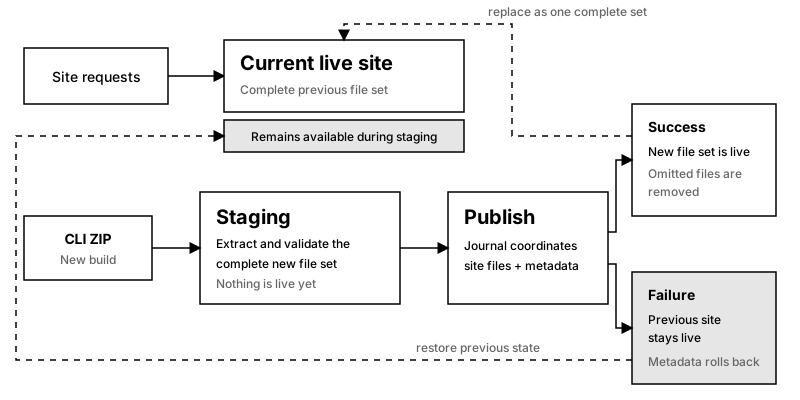
Keep index.html at the root of ./dist when it should serve at the root site URL. The CLI uploads regular build output from the directory and the server validates the resulting ZIP archive before publishing it.
Replace A Site
Section titled “Replace A Site”Deploy the new build with the same site name:
buzz deploy ./dist --site my-siteA successful redeployment creates a numbered, immutable deployment and makes it live. Files omitted from the new build are not part of the new deployment. If validation or publishing fails, Buzz keeps serving the previous deployment.
Buzz retains the 10 most recent deployments for each site. Older deployments and their files are removed automatically. List retained deployments with buzz deployments list, or make one live with buzz deployments use <deployment-number>.
Only the owner can replace a site. A deployment token can replace only the site to which it is scoped.
Inspect The Deployment
Section titled “Inspect The Deployment”Show the site URL stored for the current project:
buzz urlList the sites owned by the signed-in user:
buzz listFor naming behavior, read Choose A Site Name. For automation, read Automate Deployments.