Manage Data And Backups
Protect deployed sites and Buzz metadata with a cold backup of the complete data volume. Stopping Buzz causes downtime, but it keeps site files, deployment journals, and the SQLite database at one consistent point in time.
Restoration replaces the data visible to Buzz. Keep the current volume unchanged, verify checksums before extraction, and restore into a separate volume so you can roll back.
Before You Start
Section titled “Before You Start”You need:
- Administrative access to the Docker host.
- A maintenance window in which Buzz can be stopped.
- Enough local free space to create or extract the archive.
- Encrypted backup storage outside the Docker host.
- Access to the deployment revision, environment values, Compose overrides, and proxy settings used by the installation.
Inventory A Complete Recovery Set
Section titled “Inventory A Complete Recovery Set”Both bundled deployments mount buzz_buzz-data at /data. Back up its contents together:
/data/data.dbcontains sites, owners, sessions, deployment tokens, and analytics./data/sitescontains deployed files and deployment operation journals./data/backupscontains the pre-migration copies ofdata.db./data/tlscontains the wildcard certificate, its private key, and the ACME account key. Without it Buzz orders a new certificate on start.
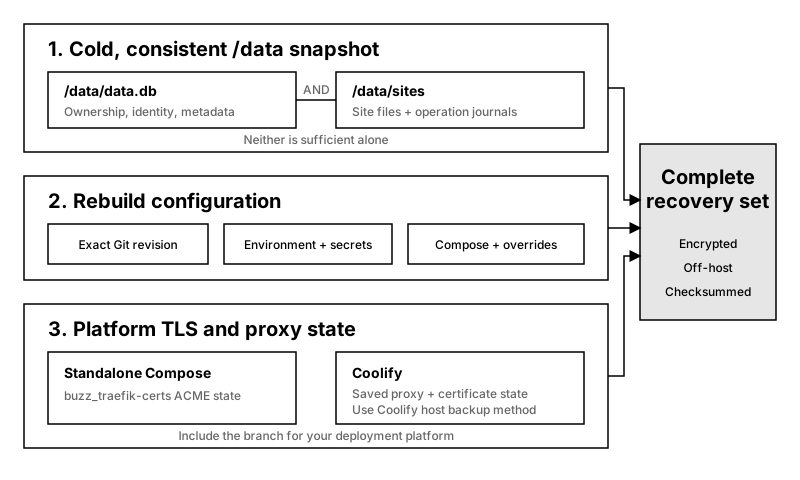
Include the TLS and proxy branch for the deployment platform you use.
Site files alone can’t reconstruct ownership or credentials. data.db alone can’t reconstruct deployed content.
A complete host recovery also needs:
- The exact deployed Git revision.
- Environment and secret values stored outside source control.
- The active Compose files and local overrides.
- For standalone Docker Compose, the
buzz_traefik-certsvolume containing the custom-domain certificates. Thebuzz_traefik-dynamicvolume holds files Buzz regenerates from/dataand needs no backup. - For Coolify, the application’s repository, deployment reference, Compose path, Raw Compose setting, and environment variables, plus the saved proxy configuration and its certificate state.
buzz-certificate.yamlandbuzz-routes.yamlin/data/coolify/proxy/dynamicneed no backup.
Treat this recovery set as sensitive. It includes identity data, token hashes, hosted content, TLS private keys, and deployment secrets. Encrypt off-host backups and restrict operator access.
Back Up Standalone Docker Compose
Section titled “Back Up Standalone Docker Compose”Run these commands from the deployment directory, where docker-compose.yml and .env are active. They stop both Buzz and its bundled Traefik proxy.
-
Record the running release and copy
docker-compose.yml,.env, andcompose.override.ymlto secure off-host storage:Terminal window docker compose images -
Check that the backup destination has room for both volumes. Compressed archives can temporarily require substantial host space:
Terminal window df -h "$PWD"docker run --rm -v buzz_buzz-data:/data:ro alpine du -sh /data -
Stop the stack without deleting its volumes:
Terminal window docker compose down -
Archive the Buzz data and certificate volumes:
Terminal window docker run --rm -v buzz_buzz-data:/data:ro -v "$PWD":/backup alpine tar czf /backup/buzz-data.tar.gz -C /data .docker run --rm -v buzz_traefik-certs:/certs:ro -v "$PWD":/backup alpine tar czf /backup/buzz-traefik-certs.tar.gz -C /certs . -
Inspect the data archive and create checksums:
Terminal window tar -tzf buzz-data.tar.gzsha256sum buzz-data.tar.gz buzz-traefik-certs.tar.gz > buzz-backups.sha256Confirm that the data archive contains
./data.dband./sites/. -
Move the archives, checksum file, revision, environment values, and Compose files to off-host storage. Verify the transferred files at the destination:
Terminal window sha256sum --check buzz-backups.sha256 -
Restart Buzz and confirm that it is healthy:
Terminal window docker compose up -dcurl --fail --show-error https://buzz.example.com/health
Back Up A Coolify Deployment
Section titled “Back Up A Coolify Deployment”Coolify controls the application lifecycle, while the Docker host owns buzz_buzz-data. Do not run an untracked docker compose down against a Coolify-managed application.
-
Record the Coolify application settings and deployed Git revision listed in Inventory A Complete Recovery Set. Copy the complete configuration shown under Servers > Proxy to secure off-host storage.
-
Use Coolify’s application controls to stop Buzz, then confirm that its server container is no longer running. This creates downtime but leaves the named volume intact.
-
Open a terminal on the Coolify host. Check destination space and archive the volume:
Terminal window df -h "$PWD"docker run --rm -v buzz_buzz-data:/data:ro alpine du -sh /datadocker run --rm -v buzz_buzz-data:/data:ro -v "$PWD":/backup alpine tar czf /backup/buzz-data.tar.gz -C /data .tar -tzf buzz-data.tar.gzsha256sum buzz-data.tar.gz > buzz-backups.sha256 -
Confirm that the archive contains
./data.dband./sites/. Move it andbuzz-backups.sha256to encrypted off-host storage, then runsha256sum --check buzz-backups.sha256there. -
Preserve Coolify’s proxy certificate state through the backup method used for the Coolify server. It holds the custom-domain certificates. The Buzz data archive holds the wildcard certificate.
-
Use Coolify’s application controls to start Buzz again. Confirm that the application is running and request
https://buzz.example.com/health.
Buzz doesn’t document or test a hot-backup method. Copying /data while Buzz accepts deployments or analytics writes may not produce a consistent restore point.
Restore Standalone Docker Compose
Section titled “Restore Standalone Docker Compose”The restored data and certificate archives can need more free space than their compressed sizes. Verify available space before creating the new volumes.
-
Place the archives and checksum file in
server, then verify them before stopping the current stack:Terminal window sha256sum --check buzz-backups.sha256df -h "$PWD" -
Stop the stack without deleting the current volumes:
Terminal window docker compose down -
Confirm that the restored volume names are unused. If either command succeeds, choose new names and use them consistently in the remaining steps:
Terminal window docker volume inspect buzz_buzz-data-restoreddocker volume inspect buzz_traefik-certs-restored -
Create separate restored volumes and extract the archives:
Terminal window docker volume create buzz_buzz-data-restoreddocker volume create buzz_traefik-certs-restoreddocker run --rm -v buzz_buzz-data-restored:/data -v "$PWD":/backup:ro alpine tar xzf /backup/buzz-data.tar.gz -C /datadocker run --rm -v buzz_traefik-certs-restored:/certs -v "$PWD":/backup:ro alpine tar xzf /backup/buzz-traefik-certs.tar.gz -C /certs -
Create
compose.restore.ymlnext to the active Compose file:volumes:buzz-data:name: buzz_buzz-data-restoredtraefik-certs:name: buzz_traefik-certs-restored -
Restore the recorded Compose file,
.env, andcompose.override.yml. Start Buzz with the restore override last. Explicit-fflags disable automatic loading ofcompose.override.yml, so list it when it exists:Terminal window docker compose -f docker-compose.yml -f compose.override.yml -f compose.restore.yml up -d -
Complete the Restore Acceptance Checks before deleting any original volume.
If acceptance fails, run docker compose -f docker-compose.yml -f compose.override.yml -f compose.restore.yml down, then start the original Compose configuration without compose.restore.yml. Investigate the restored volumes without changing the originals.
Restore A Coolify Deployment
Section titled “Restore A Coolify Deployment”Do not overwrite buzz_buzz-data. Coolify’s Raw Compose deployment treats the repository Compose file as the source of truth, so changing the active volume requires a deliberate deployment revision.
-
Verify
buzz-backups.sha256and confirm that the host has room for the uncompressed restored volume. -
Stop Buzz through Coolify and confirm that its server container is no longer running.
-
On the Coolify host, confirm that the restored volume name is unused. If this command succeeds, choose a new name and use it consistently in the remaining steps:
Terminal window docker volume inspect buzz_buzz-data-restored -
Create and populate the separate volume:
Terminal window docker volume create buzz_buzz-data-restoreddocker run --rm -v buzz_buzz-data-restored:/data -v "$PWD":/backup:ro alpine tar xzf /backup/buzz-data.tar.gz -C /data -
Prepare a recovery revision of the deployment repository’s
docker-compose.ymlthat changes the top-levelbuzz-datavolume name frombuzz_buzz-datatobuzz_buzz-data-restored. Point the Coolify application at that revision and restore the recorded application environment and settings. -
Restore the saved proxy configuration and certificate state only as part of the Coolify server’s established recovery procedure. The Buzz data restore doesn’t require replacing a healthy proxy.
-
Deploy the recovery revision through Coolify and complete the Restore Acceptance Checks.
If acceptance fails, stop the application, point it back to the previously recorded revision and buzz_buzz-data, and deploy through Coolify. Keep both volumes until you understand the failure.
Restore A Pre-Migration Backup
Section titled “Restore A Pre-Migration Backup”When a new release has pending database migrations, Buzz copies data.db to /data/backups/data-schema<version>-<timestamp>.db before migrating and keeps the two newest copies. If the copy fails, Buzz refuses to start instead of migrating. These copies make an update reversible. They don’t replace cold backups: they cover only data.db, and they live on the same volume.
An older release that refuses the migrated database names the backup to restore:
Database schema version 18 is newer than supported version 17: ... restore /data/backups/data-schema17-20261009T104832Z.db over /data/data.db ...With Buzz stopped and the previous release’s Compose file in place, copy that file over the database:
docker run --rm -v buzz_buzz-data:/data alpine \ sh -c 'cp /data/backups/data-schema17-20261009T104832Z.db /data/data.db && rm -f /data/data.db-journal'Then start Buzz. Restoring discards database changes made after the update, such as new sites, deployments, tokens, and sessions. Files deployed after the update stay on disk but are no longer served. Redeploy those sites.
Restore Acceptance Checks
Section titled “Restore Acceptance Checks”Do not delete the original data or certificate volumes until all checks pass:
- Confirm that the Buzz server and proxy remain running and that server logs contain no database or deployment-reconciliation error.
- Request
https://buzz.example.com/healthand expect"status":"ok". It can reportdegradedfor a few minutes after the start, until Buzz has published its certificate and checked it. - Sign in with a known GitHub account and confirm that the dashboard shows the expected owned sites.
- Open a known site URL and compare a distinctive file or page with the backup source.
- Deploy or redeploy a disposable site, open it, and delete it. This checks database writes and site filesystem writes.
- Inspect the certificate for a site hostname using Verify DNS, Routing, And TLS. Confirm the wildcard name and validity dates.
Keep the pre-restore volumes for a defined rollback period. Remove them only after the restored deployment has passed normal operation and a new cold backup has been verified off-host.