Configure DNS And TLS
Route the Buzz dashboard and all site hostnames to one server, then let Buzz issue a certificate that covers both hostname forms. Buzz validates it with Let’s Encrypt DNS-01 through the Cloudflare API, so the zone must be hosted on Cloudflare.
Before You Start
Section titled “Before You Start”You need:
- A public server IP address.
- A Cloudflare-managed DNS zone for
example.com. - Permission to edit the zone’s DNS records and API tokens.
- TCP ports
80and443open to the server. Port80serves the HTTP-to-HTTPS redirect and the HTTP-01 challenges for custom domains.
Before pointing public records at the server, complete the access decision in the Self-Hosting Overview. Closed-group deployments need upstream access controls before exposure.
Point Both Hostname Forms At The Server
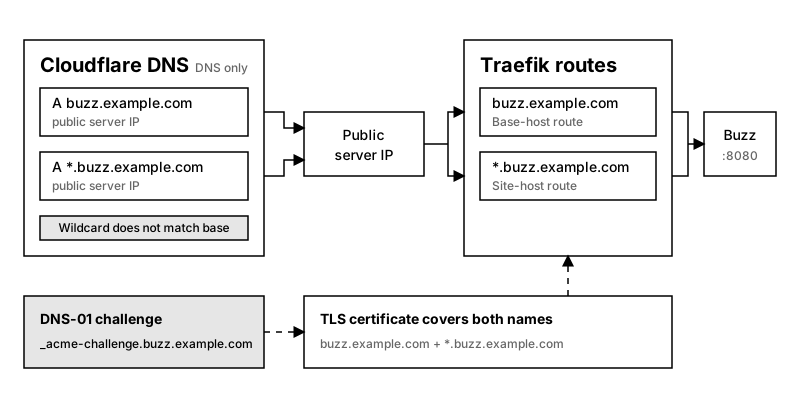
Section titled “Point Both Hostname Forms At The Server”In Cloudflare, open DNS > Records and select Add record. Create these records in the example.com zone:
- Set Type to A, Name to
buzz, IPv4 address to the server IP, and Proxy status to DNS only. - Set Type to A, Name to
*.buzz, IPv4 address to the server IP, and Proxy status to DNS only.
The wildcard record doesn’t cover buzz.example.com, so both records are required. Use equivalent AAAA records only when the server has working public IPv6 routing.
Verify both records from outside the server’s local network:
dig +short buzz.example.comdig +short my-site.buzz.example.comBoth commands should return the public server IP.
Create A DNS Challenge Token
Section titled “Create A DNS Challenge Token”In Cloudflare, open My Profile > API Tokens, select Create Token, and use the Edit zone DNS template. Add Zone:Read and restrict Zone Resources to the example.com zone. The resulting token must be able to find the zone and create and remove the DNS TXT records for _acme-challenge.buzz.example.com. Cloudflare can’t scope a token below one zone, so it can edit every record in example.com.
Set this token as BUZZ_CLOUDFLARE_DNS_API_TOKEN for the Buzz server, in the standalone Docker Compose .env file or in the Coolify application.
Treat the token as a secret. Revoke and replace it if it appears in logs, shell history, or source control.
Issue The Wildcard Certificate
Section titled “Issue The Wildcard Certificate”Buzz requests buzz.example.com and *.buzz.example.com from Let’s Encrypt when it starts. It creates the TXT records through the Cloudflare API, waits until every nameserver of the zone serves them, and removes them after validation. Buzz keeps the certificate in /data/tls and publishes it to Traefik’s file-provider directory as buzz-certificate.yaml. It renews when a third of the certificate’s lifetime remains. The proxy needs no certificate resolver for these names, and must not have one: two certificates for the same names make Traefik pick one at random.
Buzz needs outbound HTTPS to api.cloudflare.com and to the ACME directory, and outbound DNS to the zone’s nameservers.
To rehearse issuance without touching production rate limits, set BUZZ_ACME_DIRECTORY_URL to https://acme-staging-v02.api.letsencrypt.org/directory. Staging certificates aren’t trusted by browsers. Buzz records which directory issued its certificate, so unsetting BUZZ_ACME_DIRECTORY_URL and restarting Buzz orders a production certificate right away.
When an order fails, Buzz keeps serving the certificate it has and retries after 2, 5, 15, and 30 minutes, then every 30 minutes. An issued certificate is never discarded because Buzz could not save or publish it, so retries don’t use up Let’s Encrypt’s duplicate certificate limit.
DNS-01 validation doesn’t require Cloudflare’s HTTP proxy. These guides keep both records at DNS only so requests reach the configured Traefik instance directly.
Verify DNS, Routing, And TLS
Section titled “Verify DNS, Routing, And TLS”Check the dashboard endpoint:
curl --fail --show-error https://buzz.example.com/healthInspect the certificate presented for a site hostname:
openssl s_client -connect my-site.buzz.example.com:443 -servername my-site.buzz.example.com </dev/null 2>/dev/null | openssl x509 -noout -issuer -dates -ext subjectAltNameThe subject alternative names should include *.buzz.example.com. A site that hasn’t been deployed can return 404; that still verifies DNS, routing, and TLS if the certificate is valid.
Certificate issuance depends on Cloudflare and Let’s Encrypt. Buzz doesn’t control their availability or issuance limits. See Troubleshoot Self-Hosting if Buzz can’t obtain the certificate.
Roll Back DNS Changes
Section titled “Roll Back DNS Changes”If the new route or certificate fails, restore the previous DNS record values and proxy status in Cloudflare. Remove the Buzz records if they didn’t exist before. Revoke the DNS challenge token if it may have been exposed.