Self-Hosting Overview
Run Buzz on infrastructure you control with Docker Compose or Coolify. This section covers the public DNS, TLS, authentication, persistent data, and operational settings needed for a production installation.
Decide Who May Reach Buzz
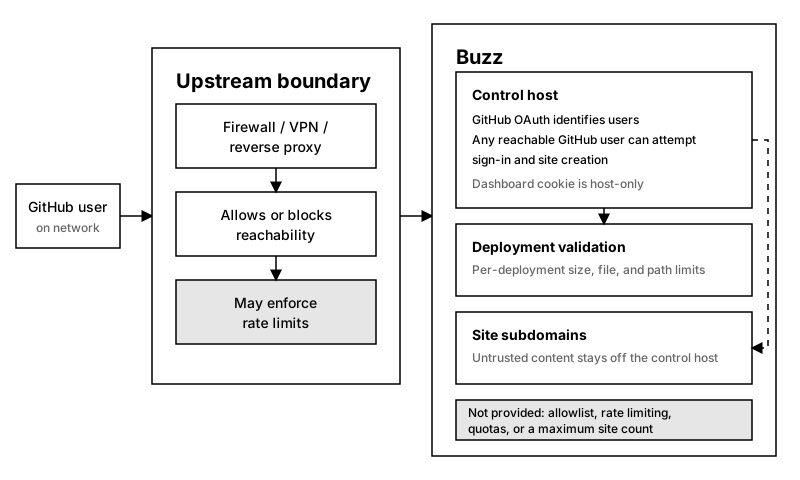
Section titled “Decide Who May Reach Buzz”Before exposing Buzz, decide who may sign in. By default, any reachable GitHub user can create sites and consume storage. Use BUZZ_ALLOWED_GITHUB_USERS for a username allowlist. Buzz has no built-in rate limiting or total or per-user storage quota.
If Buzz is for a closed group, configure and verify access controls and rate limits at an upstream proxy, virtual private network, or firewall before deployment. Review Buzz’s security boundaries for the controls the upstream layer must provide.
Prepare The Host
Section titled “Prepare The Host”You need:
- A Linux server with Docker Engine and Docker Compose, or a Coolify server.
- A domain whose DNS records you can change. These guides use
buzz.example.comas the Buzz domain. - Public access to TCP ports
80and443. Port80serves the HTTP-to-HTTPS redirect and the certificate challenges for custom domains. - A GitHub account that can create an OAuth app.
- A backup destination outside the Docker host.
The domain’s DNS zone must be hosted on Cloudflare. Buzz obtains its wildcard certificate from Let’s Encrypt through DNS-01 validation with the Cloudflare API. Other DNS providers aren’t supported.
Choose A Deployment Path
Section titled “Choose A Deployment Path”- Use Docker Compose when you manage Docker and Traefik on the host.
- Use Coolify when Coolify already manages the host and its Traefik proxy. Buzz needs no changes to Coolify’s proxy.
Both paths run the published Buzz server image and mount the named volume buzz_buzz-data at /data. The volume contains deployed site files, the SQLite database, users, sessions, deployment tokens, analytics, and the wildcard certificate.
Understand The Public Endpoints
Section titled “Understand The Public Endpoints”Buzz routes requests by hostname:
https://buzz.example.comserves the dashboard and API.https://my-site.buzz.example.comserves the site namedmy-site.
The base hostname and wildcard hostname must both resolve to the server. TLS must cover buzz.example.com and *.buzz.example.com.
Complete The Production Setup
Section titled “Complete The Production Setup”- Decide whether the server may be public. Configure upstream controls first if access must be restricted.
- Choose the Buzz domain and configure DNS and TLS for the base and wildcard hostnames.
- Create the GitHub OAuth app for the intended dashboard URL.
- Deploy Buzz with Docker Compose or Coolify using the domain and GitHub credentials.
- Follow the selected deployment guide’s success checks.
- Configure deployment limits for the host.
- Create and verify a backup.
Use the configuration reference for the complete environment variable list.