Hosting Behavior
Buzz serves each deployed site from its site hostname. This reference describes file lookup, fallback status codes, methods, and content types.
Each site deployment is an immutable, numbered set of files. Exactly one retained deployment is live. Buzz keeps the 10 most recent deployments and automatically removes older deployment history and files.
Site Hostnames
Section titled “Site Hostnames”With BUZZ_DOMAIN=buzz.example.com, the control host is buzz.example.com and a site named my-site is served from my-site.buzz.example.com.
Requests to a site hostname are isolated from control routes. For example, /health on a site hostname looks for that site’s content instead of returning the Buzz server health response.
Site hostnames accept GET and HEAD. Other methods return 405 Method Not Allowed with Allow: GET, HEAD.
Custom Hostname Normalization
Section titled “Custom Hostname Normalization”When the optional custom-domain control plane is enabled, Buzz trims surrounding whitespace and a trailing dot, applies non-transitional UTS #46 processing through IDNA2008, and stores the lowercase ASCII hostname. For example, München.Example. becomes xn--mnchen-3ya.example.
Claims reject URLs, ports, paths, wildcards, IP addresses, single-label and local names, and the configured Buzz domain or any of its subdomains. TXT verification and routing always use the normalized ASCII hostname.
A site can have multiple independently verified custom hostnames. Every alias serves the same deployment and analytics identity as the permanent Buzz hostname. Removing one alias does not affect the others or change the site’s deployment name.
Explicit direct claims activate after DNS and origin validation. Explicit cloudflare claims run credential-free edge and origin diagnostics and can activate only when the server operator enables Cloudflare activation. When the client omits the mode, Buzz accepts the claim only if automatic path observation is ready; it never silently substitutes an explicit direct claim.
Automatic claims may transition between direct and Cloudflare paths after generation-qualified DNS and path evidence is stable. Missing, invalid, or stale Cloudflare range data blocks Cloudflare cutover and immediately fails closed for an active Cloudflare path. Cloudflare range validation and confirmation include every A and AAAA answer. Every address in a runtime-reachable family must pass edge TLS and challenge validation. Buzz tolerates a wholly unroutable IPv6 family only when every IPv6 address has an address-family routing limitation and IPv4 fully validates; partial or ordinary failures remain blocking.
File Lookup Order
Section titled “File Lookup Order”Buzz decodes the URL path, rejects paths that escape the site directory, and checks candidates in this order:
- The exact requested file.
- If the path ends in
/,index.htmlinside that directory. - If the resulting path does not end in
.html, the same path with.htmlappended. - If the resulting path does not end in
.html,index.htmlbelow that path. - The site’s root
200.htmlfallback. - The site’s root
404.htmlpage. - Buzz’s plain-text
404 Not Foundresponse.
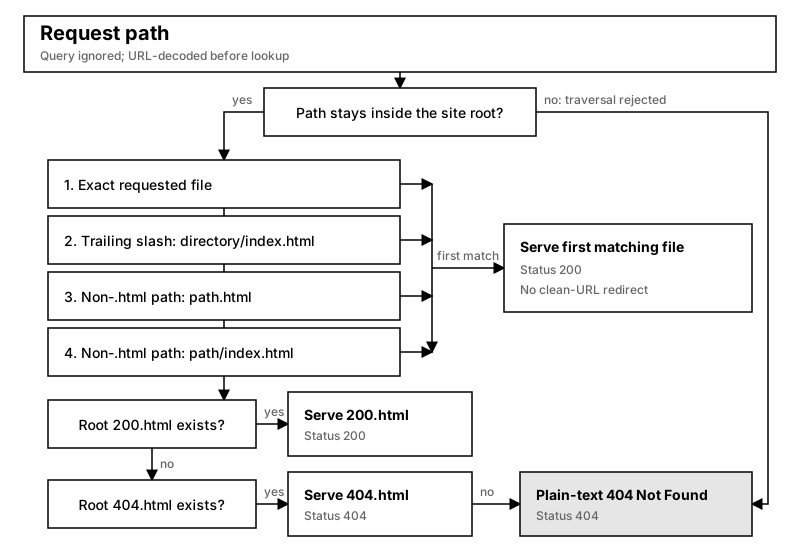
The first matching file is returned. Buzz does not redirect a clean URL to the underlying HTML file.
A trailing slash requests a directory’s index.html. When both docs.html and docs/index.html exist, /docs serves docs.html and /docs/ serves docs/index.html. If that directory has no index, Buzz uses the site’s fallback pages rather than the neighboring docs.html file.
Common paths resolve as follows:
| Request | Candidate |
|---|---|
/ |
/index.html |
/about |
/about, then /about.html, then /about/index.html |
/docs/ |
/docs/index.html |
/assets/app.js |
/assets/app.js first |
Query parameters do not change file lookup. A request for /assets/app.js?v=2 serves /assets/app.js when it exists.
Single-Page Application Fallback
Section titled “Single-Page Application Fallback”Add 200.html at the root of a deployed site to handle client-side routes. Buzz serves it only after the requested file and clean-URL candidates do not exist.
The fallback response has status 200, so a browser can load the application and let its router interpret the original URL. Because 200.html is checked before 404.html, a site with both files uses 200.html for every otherwise unmatched path.
Not Found Responses
Section titled “Not Found Responses”If no requested file or 200.html fallback matches, Buzz checks for 404.html at the site root. A custom page is returned with status 404 and content type text/html.
If the site has no custom page, Buzz returns plain text with status 404. A hostname without a deployed site also returns 404.
Content Types
Section titled “Content Types”Buzz chooses a response content type from the served file’s extension:
| Extension | Content Type |
|---|---|
.html |
text/html |
.css |
text/css |
.js |
application/javascript |
.json |
application/json |
.png |
image/png |
.jpg, .jpeg |
image/jpeg |
.gif |
image/gif |
.svg |
image/svg+xml |
.ico |
image/x-icon |
.txt |
text/plain |
.xml |
application/xml |
Files with any other extension use application/octet-stream.